
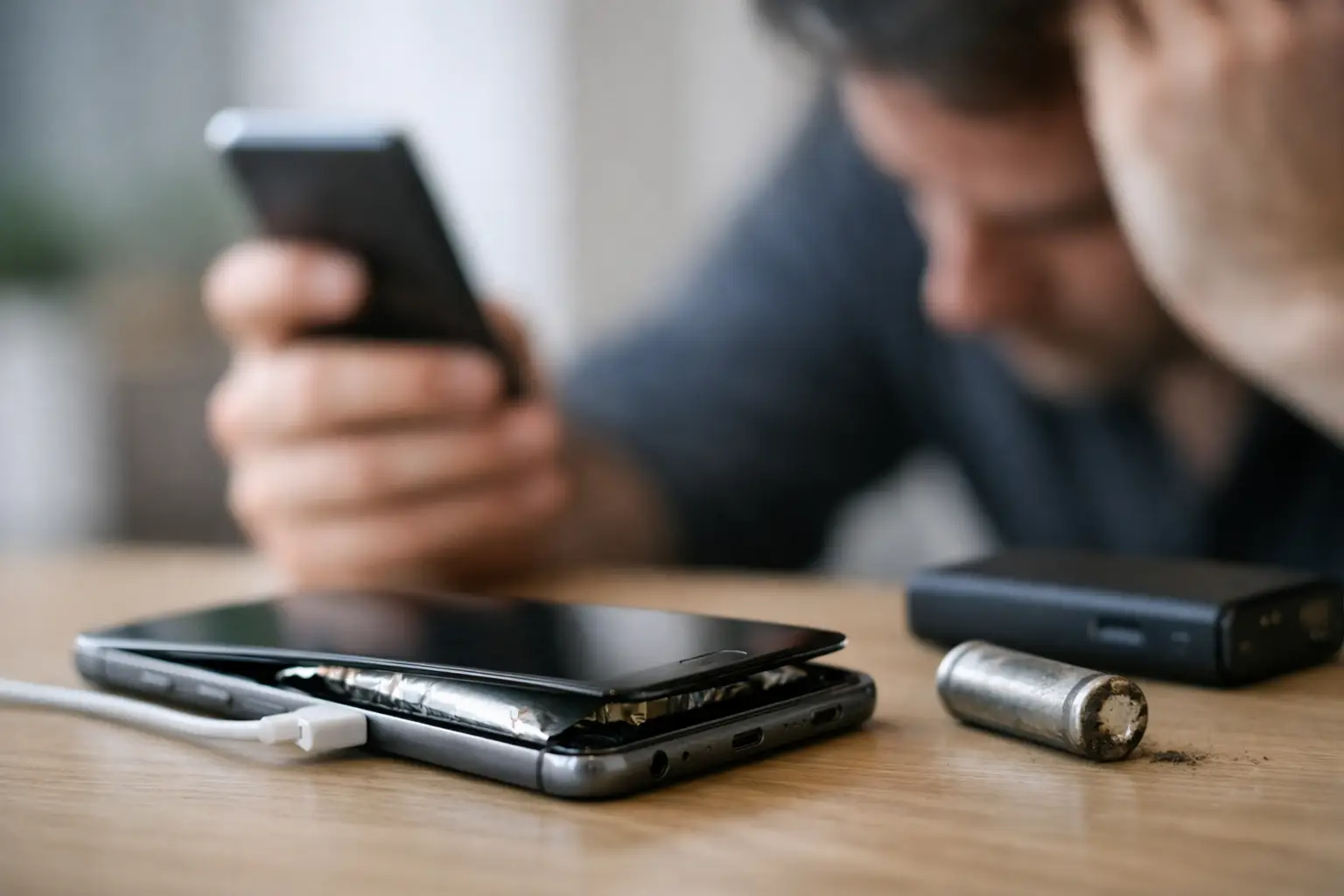
A phone that needs a charger by lunchtime can turn an ordinary day into a problem. The signs of a failing phone battery are not always dramatic at first, but they tend to get harder to ignore when you depend on your device for work calls, school, directions, banking, and family messages.
A worn battery does not automatically mean you need a new phone. In many cases, a professional battery replacement can restore dependable daily use for far less than the cost and hassle of replacing the entire device. The key is knowing what is normal battery drain, what points to a failing battery, and when it is time to stop guessing.
Signs of a Failing Phone Battery You Shouldn’t Ignore
1. Your battery percentage drops unusually fast
Every phone loses charge faster during heavy use. Streaming video, navigation, gaming, video calls, weak cell service, and a bright screen all make the battery work harder. But if your phone falls from 80% to 40% after light use, or cannot make it through a typical morning, the battery may no longer be holding its original capacity.
This change is usually gradual. You may start carrying a charger everywhere, turning on Low Power Mode more often, or avoiding apps that you know will drain the phone. Those workarounds can get you through the day, but they do not restore a battery that has worn down.
2. The phone shuts off before it reaches 0%
An unexpected shutdown at 20%, 30%, or even higher is one of the clearest warning signs. Your phone may show that it has plenty of power left, then turn off when you open the camera, make a call, or use an app that requires more power.
This can happen because an aging battery struggles to deliver power consistently under demand. Cold weather can make the issue more noticeable, but it should not become your normal experience. A phone that shuts down unexpectedly is unreliable, especially if you need it for work, school pickup, emergency calls, or two-factor login codes.
3. Charging takes too long or behaves inconsistently
A healthy phone battery should charge at a predictable pace with a compatible cable, adapter, and charging port. If your device takes hours to gain a small amount of charge, stops and starts while connected, or seems stuck at one percentage, there may be a battery problem.
Still, do not assume the battery is always to blame. A damaged cable, weak charging block, dirty charging port, or wireless charger that is not aligned properly can create similar symptoms. That is why a free diagnosis is useful – it helps identify whether you need a battery replacement, a port repair, or simply a new charging accessory.
4. The phone gets hot during ordinary use
Phones can warm up while charging, running a demanding game, recording video, or sitting in a hot car. What is not normal is repeated overheating during simple tasks such as texting, browsing, or checking email.
A failing battery can create excess heat, and heat can speed up battery wear. Background apps, software issues, and charging problems may also contribute, so this is another symptom that deserves a real diagnosis rather than a quick guess. If the phone becomes too hot to hold comfortably, disconnect it from power and stop using it until it cools down.
5. The battery percentage jumps around
Does your phone stay at 100% for a long time, then drop quickly? Does it move from 45% to 28% without much use? Inaccurate battery readings can happen after software updates or occasional glitches, but frequent percentage jumps often point to a battery that is no longer performing consistently.
Restarting the device and installing available software updates may help rule out a temporary software issue. If the behavior continues, the battery may need attention. A technician can check the device condition and help you avoid paying for a repair that will not solve the problem.
6. Your phone feels slow or apps crash more often
Older batteries can affect more than charging time. Some phones reduce performance when the battery cannot provide steady power, which can make apps feel slower, screens less responsive, or camera use more frustrating. You might notice lag when switching between apps or a device that struggles with tasks it handled easily a year ago.
That does not mean every slow phone needs a battery. Storage that is nearly full, an outdated operating system, or physical damage can also affect performance. But when slowdowns appear alongside short battery life and random shutdowns, a worn battery becomes a stronger possibility.
7. The screen is lifting or the phone looks swollen
This is the symptom to take most seriously. A swollen lithium-ion battery can push against the screen or back of the phone, creating a gap, lifting the display, or making the device look bent. Do not press the screen back into place, puncture the battery, or keep charging the phone to see if it improves.
Turn the phone off if you can, avoid using or charging it, and have it inspected promptly. Battery swelling is not a do-it-yourself repair. A trained technician can handle the device carefully and determine the safest next step.
Battery Trouble or Something Else?
Battery symptoms can overlap with other phone problems. For example, a device that will not charge may have a worn battery, but it could also have lint packed into the charging port. A phone that drains quickly may be stuck searching for service in a low-signal area. An app running in the background, a recent software update, or a failing charging cable can also change what you see.
Start with a few simple checks. Try a known-good charging cable and wall adapter. Check whether the charging port looks dirty or damaged. Review battery usage in your phone settings to see whether one app is using an unusual amount of power. If your phone supports battery health information, review that too, but treat it as one clue rather than a final answer.
If the issue keeps happening, a professional diagnostic can save time. It is especially worthwhile when your phone has been dropped, exposed to moisture, has a cracked screen, or has more than one symptom. Repairing the wrong component is frustrating and expensive.
When a Battery Replacement Makes Sense
A battery replacement is often a smart choice when your phone otherwise works well. If the screen is clear, cameras are functioning, software is supported, and the device meets your daily needs, replacing the battery can give it a useful second life.
It depends on the phone’s overall condition. A newer iPhone or Samsung Galaxy with weak battery life is usually a strong repair candidate. An older device with major screen damage, charging trouble, water damage, and performance issues may need a broader repair plan. In some situations, choosing a certified pre-owned unlocked phone can be more practical than investing in multiple repairs.
The right answer should be based on the device in front of you, not a one-size-fits-all recommendation. A clear diagnosis and transparent estimate let you compare the cost of repair with the cost of replacement before making a decision.
What to Do Before You Bring Your Phone In
If your phone still turns on, back it up before any repair. Save important photos, messages, school files, and work documents to your preferred cloud service or computer. Bring your passcode if requested, since technicians may need to test charging, power, cameras, and other functions after the repair.
Do not keep using a phone with a visibly swollen battery. Avoid leaving it on a charger overnight, placing it under a pillow, or storing it in a hot vehicle. Safety comes first, and quick attention can help prevent more damage to the display or internal components.
For customers around St. Charles and greater St. Louis, Mr. Mobile can inspect battery concerns, explain what is causing the problem, and complete many repairs the same day. You should leave with more than a phone that powers on – you should know it can keep up with the day ahead.
A reliable phone should not make you plan your life around the nearest outlet. If charging has become a daily struggle, get the problem checked before a small battery issue becomes the reason you miss something important.