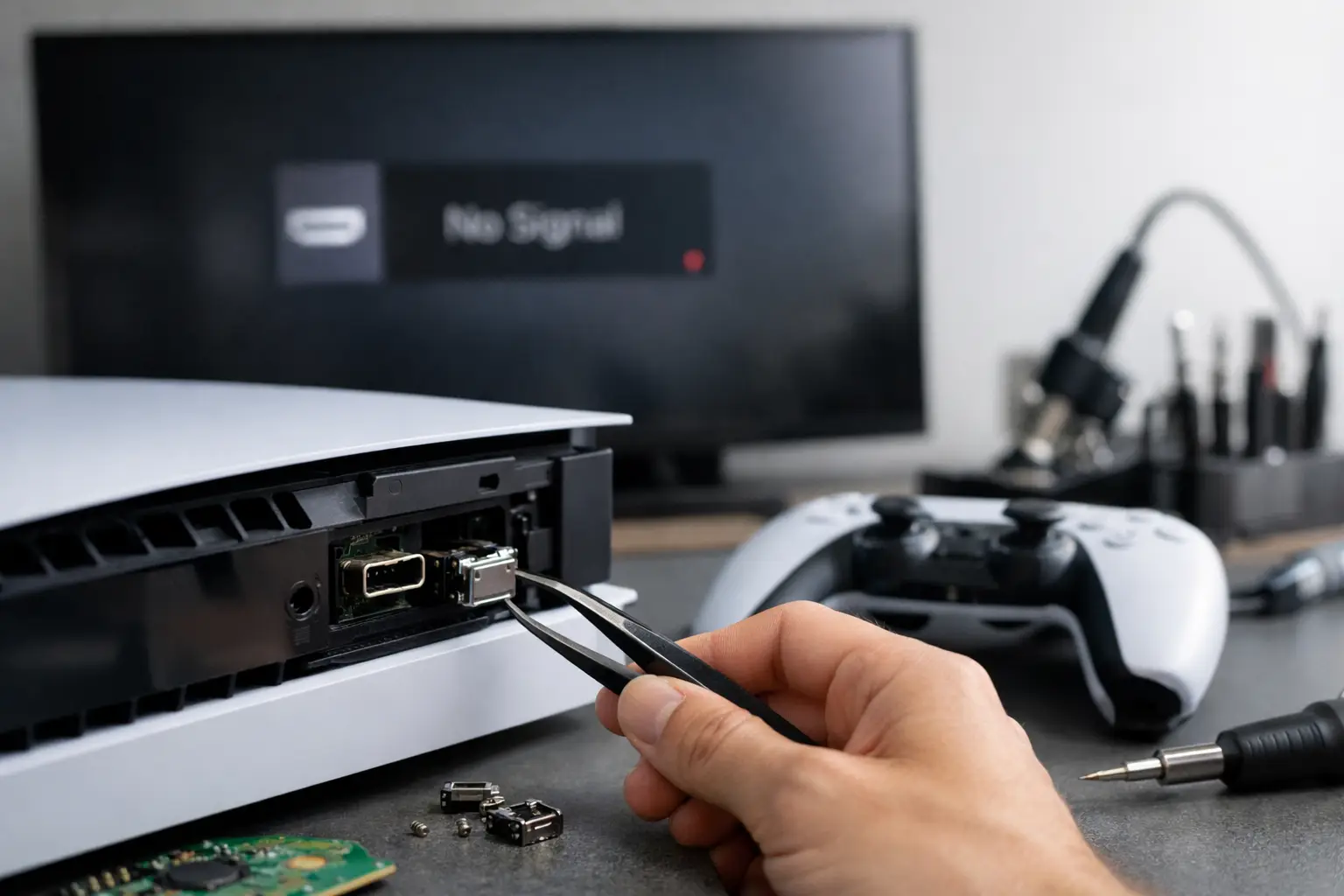
A PS5 that powers on but gives you a black screen can turn a relaxing night of gaming into instant frustration. In many cases, PS5 HDMI port repair is the answer, especially after the console was dropped, pulled from the TV stand, moved while connected, or forced into a tight entertainment center.
The HDMI port is a small part with a big job. It transfers the picture and sound from your console to the TV or monitor. When that connection is damaged, your PS5 may still appear to turn on normally, but there is no image, no audio, or an error message such as “No Signal.” The good news is that a damaged HDMI port does not automatically mean you need a new console.
Signs You May Need PS5 HDMI Port Repair
The most common sign is simple: the console turns on, the light behaves normally, but the TV cannot find a signal. Before assuming the port is bad, try a different HDMI cable and test the PS5 on another TV or monitor. A worn cable, incorrect TV input, or display setting can create symptoms that look like port damage.
If the issue follows the console after those basic checks, look closely at the HDMI connection. A loose cable that wiggles easily, a port that looks bent or pushed inward, or visible damaged pins are strong signs that the port needs professional attention. You may also see a picture that cuts in and out, random colored pixels, flickering, or audio with no video.
Physical damage is not always obvious. HDMI pins are tiny, and the port can be cracked underneath where it attaches to the board. That is why a proper diagnosis matters. Replacing a cable is easy and inexpensive. Replacing an HDMI port is precision board work.
Why PS5 HDMI Ports Get Damaged
Most HDMI port failures happen from pressure, not from normal gaming use. A cable pulled sideways can bend the internal pins or loosen the port from the motherboard. This commonly happens when a console gets bumped during cleaning, kids or pets catch a cable, or the PS5 is moved without disconnecting everything first.
Tight TV stands can also cause trouble. If the HDMI cable is sharply bent against a wall or furniture, it puts steady pressure on the port. Over time, that strain can weaken the connection. Using a cable that is too stiff or too heavy can add to the problem, particularly if the console sits vertically.
There are also cases where the HDMI port looks fine but the issue is deeper. Damage to the HDMI circuit, nearby filters, or other board-level components can produce similar no-signal symptoms. That is why an experienced technician should test the system before promising a specific repair.
What Happens During a Professional Repair
A quality HDMI repair is more involved than swapping a part. The console must be opened carefully, the motherboard must be removed, and the damaged port must be inspected under magnification. The old port is removed using controlled heat, then the board pads and surrounding area are cleaned before a replacement port is installed.
Each connection needs to be aligned correctly and soldered securely. A technician should also inspect the board for lifted pads, damaged traces, missing components, or signs of previous repair attempts. After the new port is in place, the console should be tested with a compatible display to confirm picture, sound, and stable signal output.
This is not the repair to rush with a household soldering iron. Too much heat can damage the board. Too little heat can leave weak connections. An incorrectly aligned port may fit an HDMI cable but still fail to display an image. Professional equipment and board-level repair experience make a real difference here.
Should You Try to Fix It Yourself?
If your HDMI cable is loose or the port has obvious damage, it can be tempting to order a replacement online and attempt the repair yourself. The part itself may not cost much, but the tools, skill, and risk are the real consideration.
A PS5 HDMI port is soldered directly to the motherboard. Repairing it typically requires a hot-air rework station, microscope or magnification, soldering tools, flux, board protection, and a steady hand. One mistake can turn a repairable port problem into a more expensive motherboard issue.
DIY may make sense for someone who already performs board-level electronics repairs and understands heat control. For most gamers, a professional repair is the lower-risk choice. You avoid experimenting on an expensive console and get a clearer answer about whether the HDMI port is truly the only issue.
How Long Does HDMI Port Repair Take?
Turnaround depends on the damage, technician workload, and whether the board needs additional work beyond the port. A straightforward port replacement can often be completed the same day, while more complicated board damage may require extra time for diagnosis and testing.
The fastest way to avoid delays is to bring the console, power cord, and HDMI cable if possible. Your technician can test the system with known-good equipment and rule out simple cable or display issues quickly. If you have noticed flickering, signal dropouts, or a recent drop, share that information too. A short history can help narrow down the cause.
At Mr. Mobile, a technician can evaluate the console and explain what is causing the no-signal issue before you commit to a repair. That means you are not paying to guess. You get a practical recommendation based on the condition of your specific PS5.
Repair Cost Versus Replacing the Console
The right choice depends on the condition of the console and the scope of the damage. If the PS5 works normally aside from the HDMI output, repairing the port is often more cost-effective than replacing the entire system. You also keep your installed games, saved data, accessories, and familiar setup.
Replacement may make more sense if the console has multiple major problems, serious liquid damage, or a damaged motherboard that requires extensive work. A technician should be upfront about that trade-off. The goal is not to push a repair that does not make financial sense. It is to help you get back to gaming with the best value available.
Ask for a diagnosis before comparing prices. A quote for a basic HDMI port replacement may not apply if the board has missing pads or damage in the HDMI circuit. Clear communication upfront helps prevent surprises later.
Protect Your PS5 HDMI Port After Repair
Once your PS5 is working again, a few small habits can help protect the new connection. Disconnect the HDMI cable before moving the console. Leave enough space behind the system so the cable is not pressed hard against a wall. Use a flexible, properly fitting cable rather than one that pulls downward or sideways.
Avoid repeatedly plugging and unplugging the cable unless necessary. When you do need to reconnect it, hold the connector body instead of yanking the cable. If your setup is frequently moved, such as a console shared between rooms, consider positioning it where the cable has room to run straight out from the port.
A no-signal screen does not have to mean game over for your console. Start with the basic cable and TV checks, then let a qualified technician inspect the system if the problem remains. Getting the right diagnosis early can keep a small HDMI issue from becoming a bigger interruption to your next game night.